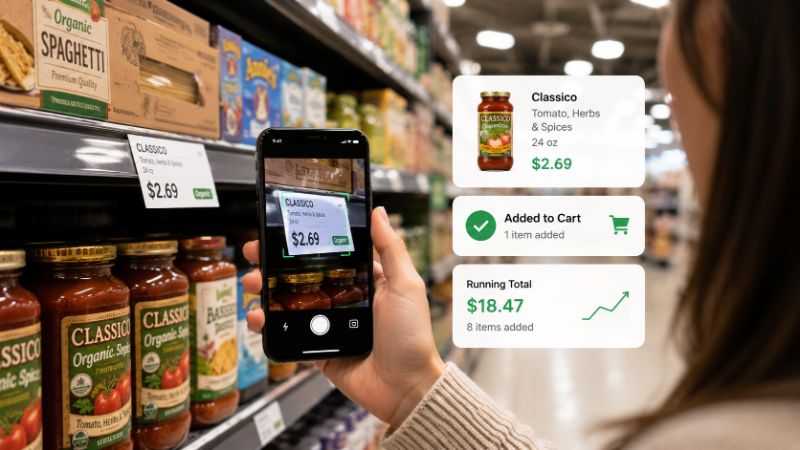
Best Shelf Price Scanner App for Android
Looking for the best shelf price scanner app for Android? Learn how shelf price scanning helps shoppers track grocery spending, compare products, and stay within budget.
Best Shelf Price Scanner App for Android
You've done it before.
Grabbed things off the shelf, told yourself you were staying on budget, and then stood at the register watching the total climb past what you planned to spend — with a line of people behind you and no good options left.
It's not a discipline problem. It's an information problem. You didn't know what you were spending because nothing was showing you.
A shelf price scanner app fixes exactly that.
It's simpler than it sounds.
You point your phone at a shelf price tag, log the price, and the app adds it to your running total. Do that for every item before it goes in the cart, and by the time you reach checkout you already know your total — down to the dollar.
No mental math. No optimistic rounding. No hoping the total is reasonable.
Just a number you've been watching build the entire trip.
Most shoppers don't overspend on one big item. They overspend on fifteen medium ones.
The $6 juice. The $4.50 yogurt. The name-brand pasta that was only $1.50 more than the store brand. None of those feel like mistakes in the moment. Each one seems fine on its own.
But ten of those decisions later, you're $25 over budget and you have no idea where it happened.
Here's why: your brain is tracking individual prices, not a cumulative total. You remember the steak was $14. You don't remember that the steak plus everything else in your cart is already $73.
A shelf price scanner shifts your attention from individual prices to your actual running total — and that one change makes an enormous difference in how you shop.
You could use your phone's calculator. You could type prices into a notes app. A lot of shoppers try both.
Here's what actually happens:
Calculator — Works for five items. By item fifteen you've made a typo, lost your place, or cleared the screen by accident. No itemized list. No way to remove something you put back.
Notes app — Better record, but you're doing all the math yourself. The formatting is messy. Pulling it up while holding products in a crowded aisle is awkward. And you still don't have a live total — just a list you have to add up later.
A dedicated shelf price scanner handles all of this automatically. Prices go in, the total updates, items can be added or removed instantly, and everything stays in one organized place for the entire trip.
There are a lot of grocery apps out there. The ones that actually get used share a few things in common — and they're not the flashiest features.
Speed above everything else. If logging a price takes more than two or three seconds, you'll stop doing it by the third aisle. The best apps are fast enough to use without breaking your stride.
A live running total. Not a total you have to calculate. One that updates the moment you add an item and adjusts the moment you remove one.
Easy item removal. You will change your mind. Putting something back should take one tap, not navigating three menus.
A clean interface you can read at a glance. You're in a store with people around you, products in your hands, and a cart to manage. The app needs to work in that environment — large text, clear layout, no clutter.
Spending history. Knowing what you spent this week is useful. Knowing what you spent the last six weeks is how you actually start to understand your grocery habits.
If an app has all of that and stays out of your way, it's worth using.
Here's the honest answer to why this works: visibility changes behavior.
When you can see your running total climbing in real time, you start making different calls. Not dramatic ones — you're not going to put back the thing you actually need. But you'll notice when you cross $50 of a $65 budget and you're still two aisles away. So you skip the snack you weren't really planning to buy. You choose the store brand instead of the name brand. You decide something can wait until next week.
None of those feel like sacrifice. They feel like decisions — because you had the information you needed while you could still do something with it.
That's the thing a shelf price scanner gives you that a shopping list never can: the ability to respond to your spending before checkout closes that window.
Scanning shelf prices is useful on its own. But it becomes genuinely powerful when every price you log feeds directly into a live running total.
That combination means you're never just collecting data — you're watching your budget respond to every decision in real time.
If you want to go deeper on the running total side of things, our guide on how to maintain a running grocery total while shopping covers the full approach.
And if you want to understand the shelf scanning process itself before committing to a method, our guide on how to scan shelf price tags while shopping walks through it step by step.
There are plenty of apps that promise to help with grocery budgeting. Most get deleted after two or three trips.
The ones that stick have one thing in common: they're faster and easier than whatever the person was doing before.
If an app makes logging a price feel like a chore, people stop logging prices. If it's slower than just typing into notes, people go back to notes. The bar isn't "does this have features" — it's "will I actually open this every time I shop."
The best shelf price scanner app for Android isn't the one with the longest feature list. It's the one that disappears into the background of your shopping routine and just quietly keeps your total accurate.
Tally Cart was designed specifically for shelf price scanning on Android — log prices from shelf tags, watch your running total update automatically, and walk into checkout already knowing what you'll pay.
You can see exactly how it works on our Shelf Price Scanner feature page.
Grocery prices aren't getting more predictable. Budgets aren't getting easier to stick to.
But the information gap — not knowing what you're spending while you're still spending it — is a problem that's completely solvable. You don't need to overhaul how you shop. You just need to be able to see your total before it's too late to change it.
That's what a shelf price scanner does. And once that information is available to you every trip, shopping without it starts to feel like flying blind.
Do I need to scan a barcode or can I just enter the price manually?
Most shelf price scanner apps support manual price entry, which is often faster than scanning. You read the tag, type the number, and move on. Some apps also support barcode scanning if you prefer that method.
Will this work in any grocery store?
Yes. The process works anywhere prices are displayed on shelf tags — which covers virtually every grocery store, supermarket, discount retailer, and warehouse club. The store doesn't need to support any particular technology.
What if a shelf tag is missing or hard to read?
Estimate slightly high and log that instead. A conservative overestimate keeps your total accurate enough to be useful. You can also check a nearby tag for a similar product, use the store's own price-checking kiosk, or ask a store associate.
How long does it take to get used to scanning prices as you shop?
Most people feel comfortable with the habit by their third trip. The first run takes a little longer while you're building the rhythm. After that, logging a price takes a few seconds per item and adds very little time to the overall trip.
Is a shelf price scanner the same as a barcode price checker?
Not quite. A barcode price checker looks up a product in a database to find a stored price. A shelf price scanner captures the actual price displayed on the shelf in your specific store — which is the price you'll actually be charged. For budget tracking, the shelf price is what matters.
What if I decide not to buy something after I've already logged it?
Remove it. A good shelf price scanner lets you delete items instantly so your running total adjusts immediately. Your list should always reflect exactly what's in your cart — nothing more.
Can I use this to compare store brands versus name brands?
That's one of the best uses. Log both prices, see the difference reflected in your total, and decide whether the name brand is worth it before it goes in the cart — not after you've already bought it.
Does this replace a shopping list?
No — and it doesn't try to. A shopping list tells you what to buy. A shelf price scanner tells you what it's costing you as you buy it. They work best together.
Bereit, Ihre Lebensmittelausgaben zu verfolgen?
Hören Sie auf, an der Kasse zu raten. TallyCart hilft Ihnen, Regalpreise zu scannen, Ausgaben in Echtzeit zu verfolgen und Ihr Budget einzuhalten.
- Ausgaben beim Einkaufen verfolgen
- Regalpreise sofort scannen
- Belege speichern und organisieren
- Im Budget bleiben