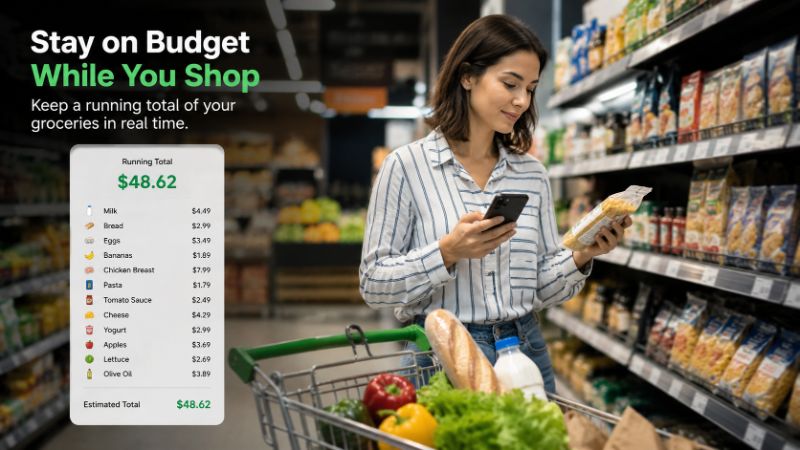
How to Keep a Running Grocery Total While Shopping
Learn simple ways to track your grocery spending while you shop, avoid checkout surprises, stay on budget, and make smarter purchasing decisions.
How to Keep a Running Grocery Total While Shopping
You walk into the store with a number in your head. Forty dollars. Maybe sixty.
Then the cart fills up, one item at a time, and by the time you reach the register that number is long gone — replaced by a total you weren't expecting.
It doesn't happen because you're careless. It happens because tracking 25+ prices in your head while navigating a busy store is genuinely hard. Here's how to fix that.
The problem isn't the big items. You notice the $14 steak or the $12 olive oil.
The problem is everything else — the $3.99 yogurt, the $2.49 crackers, the $6 juice that seemed fine in the moment. Those mid-range items are the ones that quietly push your total past your budget without ever feeling like a splurge.
Add in fluctuating prices, items that are on sale but still expensive, and a cart that fills gradually over 20 or 30 minutes, and it becomes almost impossible to know where you stand until it's too late to do anything about it.
A shopping list tells you what to buy. A running total tells you what it's costing you — and that's the part most shoppers are missing.
The simplest starting point. Open the calculator, add each price as you go, and watch the total climb.
What works: It's fast to start, requires no setup, and most people already have it.
What doesn't: You lose the item breakdown the moment you clear the screen. One wrong tap means starting over. And on a longer trip with 30+ items, entering every price without making a mistake gets tedious quickly.
Good for a quick 10-item run. Not ideal for a full weekly shop.
A step up from the calculator. Type each item and price into your notes app as you go, then add everything up at the end.
It might look like this:
- Milk — $4.99
- Bread — $2.79
- Eggs — $5.49
- Butter — $4.29
What works: You get an itemized record you can review later. It's easy to remove something if you change your mind.
What doesn't: You still have to add it all up manually. The formatting is messy. And pulling up your notes app in the middle of a crowded aisle while holding products gets old fast.
This is where the process actually becomes effortless.
Instead of adding up numbers yourself or maintaining a messy list, a grocery tracking app captures each price and updates your total automatically. You log the item, the math happens instantly, and you always know your current spend without doing anything extra.
The difference in experience is significant:
- Your total is always visible, not buried in a calculator
- You can remove items and watch the total adjust immediately
- You finish shopping already knowing what checkout will cost
- You can make real decisions mid-trip — "do I actually need this?"
This is the method that turns budget awareness from an intention into something that actually happens every trip.
There's something specific that happens when your running total is visible while you're still in the store: you start making different decisions.
Not dramatic ones. You don't put everything back. But you notice when crossing from aisle 3 to aisle 4 that you've already spent $48 of your $60 budget. So you skip the snack you were going to grab without thinking. You choose the store brand pasta instead of the premium one. You decide the fancy cheese can wait until next week.
None of those decisions feel like sacrifice in the moment. They feel like control — because you had the information you needed, when you needed it.
That's what a running total gives you that a shopping list never can.
Knowing your total early enough means you can actually do something about it. Here's a simple approach:
Prioritize by necessity. Keep proteins, dairy, and staples. Review snacks, extras, and anything you grabbed impulsively.
Look for swaps. Is there a store brand version of something in your cart? A smaller size? A similar product at a lower price point?
Remove, don't just skip. If you already logged an item you're putting back, remove it from your list so your total stays accurate.
Set a soft limit. If your budget is $80, aim to hit the last aisle at $65. That buffer absorbs the items you inevitably forget to add or underestimate.
If you want all of this to happen without mental effort, Tally Cart does exactly that — scan or enter shelf prices as you shop, watch your running total update automatically, and arrive at checkout with no surprises.
You can see how it works on our shelf price scanner feature page.
The gap between your budget and your receipt isn't usually one big mistake. It's twenty small ones that added up while you weren't watching.
A running grocery total closes that gap — not by making you spend less, but by making sure you know what you're spending while there's still time to adjust.
Start simple. Even a notes app is better than nothing. But once you try a method that updates your total automatically, it's hard to go back to guessing.
Do I need to track every single item to make this work?
Not necessarily — but the closer to every item, the more accurate your total. If you're going to skip anything, skip the very cheap items (under $1) and focus on logging everything $2 and above. That's where most of your budget actually goes.
What if I forget to log something mid-trip?
Add it as soon as you remember. If you genuinely can't recall the price, go back to the shelf or estimate slightly high. A conservative overestimate is always safer than leaving it out entirely.
Is this worth doing for a small grocery run?
If you're grabbing three things, probably not. But if you're doing a weekly shop with 15 or more items, yes — the habit pays off quickly, especially when prices are unpredictable.
How do I handle items sold by weight, like produce or deli meat?
Estimate based on what you plan to buy. If you're getting roughly a pound of something priced at $4.99/lb, log $5. It won't be exact, but it keeps your total in the right range.
Does tracking prices actually change how much people spend?
Research on spending awareness consistently shows that people spend less when they can see their total in real time — the same reason stores don't put price displays on shopping carts. Visibility creates accountability, and accountability changes behavior.
Can I use this method at any grocery store?
Yes. The method works anywhere prices are displayed on shelf tags, which covers virtually every grocery store, supermarket, warehouse store, and discount retailer. The app or tool you use doesn't change — only the prices do.
What's the difference between a shopping list and a running total?
A shopping list tells you what to buy. A running total tells you what it's costing you as you buy it. Both are useful — but only one of them prevents checkout surprises.
Bereit, Ihre Lebensmittelausgaben zu verfolgen?
Hören Sie auf, an der Kasse zu raten. TallyCart hilft Ihnen, Regalpreise zu scannen, Ausgaben in Echtzeit zu verfolgen und Ihr Budget einzuhalten.
- Ausgaben beim Einkaufen verfolgen
- Regalpreise sofort scannen
- Belege speichern und organisieren
- Im Budget bleiben