Why Barcode Scanners Don't Help With Grocery Budgets
Barcode scanner apps can identify products, but they don't help shoppers stay within budget. Learn why tracking shelf prices is more useful for grocery spending.
Why Barcode Scanners Don't Help With Grocery Budgets
There's a moment most shoppers have experienced.
You're standing in the cereal aisle, genuinely trying to be responsible. You pull out your phone, scan the barcode on the box, and wait for the app to tell you something useful.
It tells you the product name. The brand. Maybe the nutrition facts.
What it doesn't tell you is the one thing you actually needed: what this item is doing to your budget right now.
That's the gap barcode scanners have never filled — and it's why so many shoppers who try them for grocery budgeting eventually give up on them.
Barcode scanners are product identification tools. That's their job, and they do it well.
Point one at a package and it will tell you:
- What the product is
- Who makes it
- What's in it
- Sometimes a price pulled from a database somewhere
That last part is where the trouble starts. Because that database price isn't the price on the shelf in front of you today. It's a stored price from somewhere, at some point — which in grocery retail means it could easily be wrong.
Grocery prices shift constantly. The same box of pasta that cost $2.49 last month might be $2.99 this week, or $1.89 if it's on promotion, or a completely different price at a different store across town. The barcode doesn't know any of that. It only knows the product.
Your budget depends on the actual number printed on the shelf tag — not a database estimate of what the product generally costs somewhere.
This is the core of the problem.
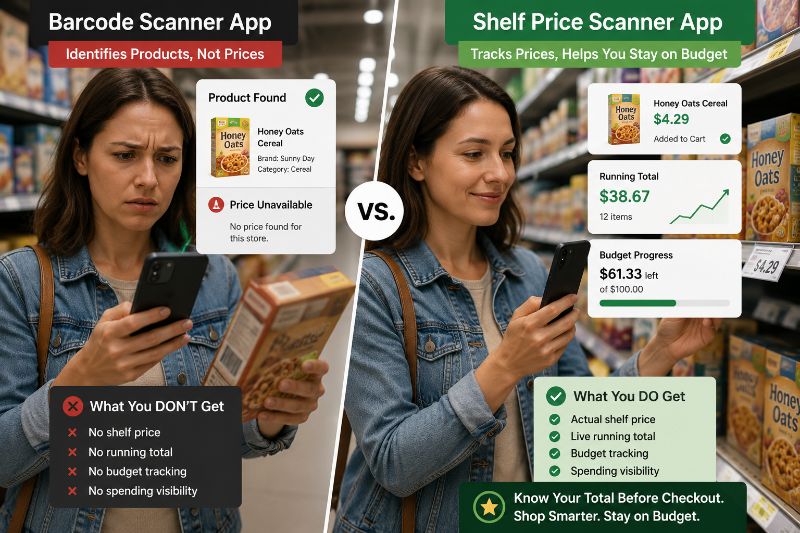
Barcode scanners answer: What is this product?
Grocery budgeting requires answering: How much am I spending right now?
Those are completely different questions. And no amount of product information answers the second one.
Knowing that the cereal is made by a particular brand, contains 12 grams of sugar per serving, and was priced at $4.49 in some database three months ago does nothing to tell you whether adding it to your cart will push you over your $60 budget for the week.
Only a running total can answer that — and running totals require tracking actual shelf prices, not product barcodes.
Most shoppers don't blow their budget on one expensive item. They blow it on fifteen medium-sized decisions that each seemed fine individually.
The $5.49 orange juice. The $4.99 yogurt multipack. The name-brand chips that were only $1.50 more than the store brand. The pasta sauce you grabbed without really looking at the price.
None of those feel like mistakes. Each one passes the "that seems reasonable" test in isolation.
But ten of those decisions later, you're $30 over budget — and you have no idea where it happened, because you were tracking products, not spending.
That's the trap. Your brain is naturally good at evaluating individual prices. It's genuinely bad at accumulating them into a running total while simultaneously navigating a store, managing a cart, and deciding between 40 varieties of pasta sauce.
A tool that gives you more product information doesn't solve that problem. A tool that shows you your running total does.
When you're trying to stay within a grocery budget, the most important number in the store isn't encoded in a barcode. It's printed in plain text on the shelf below the product.
That shelf tag shows you:
- The price you will actually pay today
- The sale price if one is running
- The unit price for comparison shopping
- Store-specific pricing that no database will have
That's the information that should be driving your spending decisions. Not a product lookup. Not a database estimate. The actual number that will appear on your receipt.
Learning how to scan shelf price tags while shopping and feeding those prices into a running total gives you something a barcode scanner never can: a real-time picture of what your cart is actually costing you.
To stay within a grocery budget, you need to be able to answer these questions while you're still in the store:
- How much have I spent so far?
- How much do I have left?
- What happens to my total if I add this item?
- Is there something in my cart I should put back?
Barcode scanners don't answer any of those questions. They give you product data when what you need is spending data.
The tool that answers all four is one that captures shelf prices and maintains a running grocery total while shopping — updating your budget position every time you add or remove an item.
That's a fundamentally different tool solving a fundamentally different problem.
Barcode scanners make intuitive sense at first. Scanning feels high-tech. Product information feels useful. It seems like the kind of thing that should help.
The disappointment usually comes around the third or fourth shopping trip, when the pattern becomes clear: you've been scanning products, collecting information, and still arriving at checkout with a total you didn't see coming.
Because the information was never the problem. The visibility was.
Once shoppers understand that distinction — that budget control is about tracking cumulative spending, not learning more about individual products — they start looking for tools built around shelf prices and running totals instead.
If you're already at that point, the guide on the best shelf price scanner app for Android walks through what to look for in an app that's actually built for budgeting.
Tally Cart was built around shelf prices and running totals — not product lookups. Log the price from the shelf tag, watch your total update instantly, and walk into checkout already knowing what you'll pay.
You can see exactly how it works on our Shelf Price Scanner feature page.
Barcode scanners and shelf price scanners are solving different problems. One tells you about products. The other tells you about your spending.
If your goal is to identify what something is, a barcode scanner is the right tool. If your goal is to stay within a grocery budget, it's the wrong one — not because it's poorly built, but because it was never designed to do what you're asking of it.
The information that protects your grocery budget isn't inside the barcode. It's printed on the shelf tag, right in front of you. You just need a fast, simple way to capture it and watch your total respond.
That's the whole idea.
Why can't barcode scanners just show me the current store price?
Because they rely on centralized product databases that aren't connected to individual store inventory systems in real time. Prices vary by location, change with promotions, and update constantly — far faster than any shared database can track. The only source that reliably shows today's price at your store is the shelf tag itself.
Are there barcode scanner apps that also track spending?
Some apps try to combine both features, but the experience is usually clunky. The barcode lookup adds steps that slow you down, the prices pulled from databases are often outdated, and the budgeting features feel bolted on rather than built around how people actually shop. Purpose-built shelf price trackers tend to be significantly faster and more accurate for budgeting.
What if I want product information and budget tracking?
Use them for different things. A barcode scanner is fine for checking ingredients, comparing nutritional info, or researching a product before you buy. For budget tracking in the store, use a shelf price scanner and log from the tag. You don't need them to be the same tool.
Is shelf price scanning faster than barcode scanning?
Usually yes. Barcode scanning requires finding the barcode, waiting for a read, and dealing with failed scans on damaged or curved packaging. Manually entering a price from a shelf tag takes two or three seconds and never fails. For budget tracking where speed matters, manual entry from the shelf tag wins almost every time.
What if a store doesn't display shelf tags clearly?
This happens occasionally, especially in older stores or with produce and deli items. In those cases, estimate conservatively and log that number — a slight overestimate keeps your budget safe. You can also ask a store associate or check the store's own app for current pricing on specific items.
Does this mean barcode scanner apps are useless for grocery shopping?
Not at all — they're just useful for different things. Checking if a product contains an allergen, comparing nutritional labels between two options, or looking up a product you're unfamiliar with are all legitimate uses. The limitation is specifically around real-time budget tracking, which requires shelf prices, not product identification.
How do I make the switch from a barcode scanner habit to a shelf price habit?
The shift is smaller than it sounds. Instead of scanning the barcode on the product, you look at the tag on the shelf below it and log that number. Same motion, different target. Most shoppers pick it up within one or two trips, especially once they see their running total updating accurately in real time.
Will tracking shelf prices slow down my shopping?
Once the habit is established — usually by the third trip — most shoppers add less than two minutes to their overall trip. The time cost is minimal. The payoff is arriving at checkout with a total you already knew was coming.
Bereit, Ihre Lebensmittelausgaben zu verfolgen?
Hören Sie auf, an der Kasse zu raten. TallyCart hilft Ihnen, Regalpreise zu scannen, Ausgaben in Echtzeit zu verfolgen und Ihr Budget einzuhalten.
- Ausgaben beim Einkaufen verfolgen
- Regalpreise sofort scannen
- Belege speichern und organisieren
- Im Budget bleiben