How to Digitize Grocery Receipts
Learn how to digitize grocery receipts to track spending, organize purchases, analyze grocery habits, and stop losing paper receipts.
How to Digitize Grocery Receipts
You made it through the store. You stayed focused, watched your prices, checked out, and grabbed the receipt on your way out.
Then you stuffed it in your pocket.
Three days later it's in the washing machine. Or the bottom of a bag. Or just gone — which means the record of exactly what you spent, what everything cost, and where your grocery money went this week is gone with it.
Paper receipts are genuinely terrible at their only job: storing information you might need later. Digitizing them fixes that — and opens up something far more useful than just having a backup copy.
It's easy to think of a lost grocery receipt as a minor inconvenience. You know roughly what you spent. You'll remember the big items.
But a receipt isn't just a total. It's a complete record of that shopping trip — every item, every price, every discount applied, every tax charged. That level of detail is what makes receipts genuinely valuable for understanding your grocery spending.
Without it, you're left with approximations. You think you spent about $70. You think you bought chicken twice this month. You think your grocery bill has been going up, but you're not sure by how much or on what.
With a digital receipt history, those approximations become facts. And facts are what let you make real decisions about your grocery budget.
Paper receipts were designed to be handed to you at checkout. Everything after that is your problem.
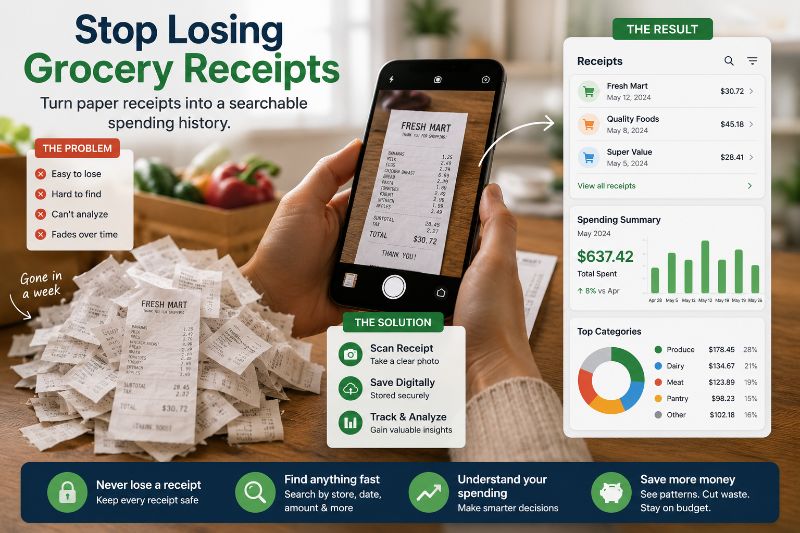
They're small and easy to misplace. The thermal printing fades within weeks, sometimes days, depending on heat and light exposure. They pile up with no organization system. You can't search them. You can't sort them by category or date or store. You can't add up totals across multiple trips without doing it by hand.
And if you actually need one — for a return, a budget review, or just to check whether a price has changed since last month — finding it in a pile of crumpled paper is its own project.
The information on that receipt is genuinely useful. The format it comes in makes it nearly impossible to use.
The process is straightforward:
After checkout, open a receipt scanning app before you leave the store or immediately when you get home.
Take a photo of the receipt while it's still flat and readable. Thermal paper fades fast — the sooner you scan it, the better the quality.
Let the app capture and store it. A good receipt scanner pulls the key information — store, date, items, prices, total — and saves it in a format you can actually use later.
Put the paper receipt wherever paper receipts go. It no longer matters, because you have the information.
That's it. Thirty seconds at most. And in exchange you get a permanent, searchable, organized record of that shopping trip.
This is where digitizing receipts stops being about organization and starts being genuinely useful for your grocery budget.
When your receipts are stored digitally over time, patterns start to emerge that are completely invisible on paper:
Price tracking across time. That box of cereal you buy every week — has the price changed in the last three months? Your digital history knows. You don't have to remember.
Category spending. How much of your grocery budget actually goes to meat versus produce versus snacks versus household items? Paper receipts can't tell you. A receipt history can.
Store comparisons. If you shop at more than one store, which one is actually cheaper for your specific shopping habits? Not in general — for the specific items you buy regularly.
Inflation visibility. Grocery prices have been volatile. A receipt history shows you exactly which items in your cart have gotten more expensive, by how much, and when the increases happened.
Monthly and seasonal trends. Do you spend more in December? Less in summer? More than you think on items you consider cheap? The data tells you things your memory can't.
None of this is available from a stack of fading paper. All of it becomes accessible once your receipts are digital.
These are two different tools solving two different parts of the same problem.
Tracking prices and maintaining a running grocery total while shopping helps you control spending before checkout — while you still have the ability to put something back or make a different choice.
Digitizing receipts helps you understand what happened after checkout — so your next trip is smarter than the last one.
Used together, they cover the full picture. You walk into the store with awareness of what you're trying to spend. You leave with a record of what you actually spent. Over time, the gap between those two numbers gets smaller.
One digitized receipt doesn't tell you much. A month of them starts to show patterns. Six months of them gives you a genuinely useful picture of your grocery spending habits.
This is the part most shoppers miss. They focus on individual trips — did I stay on budget this week? — when the more useful question is: what does my grocery spending actually look like over time, and where is it going?
That question is only answerable with records. And records only exist if you capture them before they disappear into a pocket and then a washing machine.
The habit is small. Thirty seconds after checkout. The payoff compounds every month you keep doing it.
Tally Cart's Receipt Scanner was built for exactly this — scan your grocery receipt after each trip, and it automatically stores and organizes your purchase history so you can track spending, spot price changes, and understand your grocery habits over time.
A grocery receipt is a snapshot of one shopping trip. On its own, it's mildly useful. As part of a growing history of every trip you've made over the past year, it's something much more valuable — a clear, detailed picture of where your grocery money actually goes.
Paper receipts can't give you that picture. They fade, disappear, and pile up in ways that make the information inside them practically inaccessible.
Digital receipts can. The information is the same. The difference is whether you'll still have it in three months when it might actually tell you something worth knowing.
Why bother saving grocery receipts if I already know what I spent?
The total is just one number. The receipt contains everything behind that number — individual item prices, quantities, discounts, taxes, and the exact date and store. That detail is what lets you track price changes over time, identify where your budget is going by category, and make informed decisions on future trips. The total alone can't do any of that.
How quickly do paper grocery receipts fade?
Faster than most people expect. Thermal paper — the kind used for most grocery receipts — can start fading in as little as a few weeks when exposed to heat, light, or friction. Receipts stored in wallets or pockets often become difficult to read within a month. Scanning immediately after checkout gives you the best image quality.
Do I need to scan every single receipt for this to be useful?
Consistency helps, but even partial records are better than none. If you miss a trip occasionally, your history is still useful for the trips you did capture. The more complete your record, the more accurate the patterns — but starting imperfectly is better than not starting at all.
What should I do with the paper receipt after scanning it?
Whatever you normally do with it. Once it's scanned, the information is preserved digitally and the paper copy no longer matters for budgeting purposes. Some people keep paper receipts for a week in case they need to make a return. After that, they can be discarded.
How is this different from just taking a photo of the receipt with my camera?
A photo preserves the image, but it doesn't extract or organize the information. You'd still have to manually search through photos, read faded text, and calculate totals yourself. A receipt scanner pulls the data from the image and structures it so you can search by date, store, or item and see totals across multiple trips automatically.
Can I use digitized receipts to catch store pricing errors?
Yes — and this is an underrated use case. If an item rings up higher than the shelf price you noted, a scanned receipt gives you a clear record of what you were charged. That's useful for requesting corrections and for tracking whether a store's pricing is consistently accurate.
How far back should I try to keep receipt records?
At minimum, enough to cover a full month of shopping so you can see your complete monthly grocery spend. Ideally, three to six months gives you seasonal comparison data. A full year is when the patterns become most useful — you can compare this January to last January and see exactly how your spending and prices have changed.
Is digitizing receipts only useful for strict budgeters?
Not at all. Even shoppers who aren't on a tight budget benefit from knowing where their money goes, catching price increases early, and having records available for returns or expense tracking. The habit is low effort and the information it produces is useful at every level of budget awareness.
Prêt à suivre vos dépenses alimentaires ?
Arrêtez de deviner en caisse. TallyCart vous aide à scanner les prix en rayon, suivre vos dépenses en temps réel et respecter votre budget.
- Suivez vos dépenses en magasin
- Scannez les prix instantanément
- Stockez et organisez vos reçus
- Respectez votre budget